Robert Desprez Communications

  • My Services
  • My Blog
  • About Me
  • Contact Me

Using ChatGPT to read smarter

August 1, 2025 by RDesprez Leave a Comment

I have a con­fes­sion. I still enjoy read­ing print­ed books: most­ly non-fic­tion. But I am now using Chat­G­PT to sum­ma­rize the chap­ters of a book before I open the cover.

Our soci­ety is not read­ing like it once did. A 2021 Pew Research study found that 23 per­cent of U.S. adults hadn’t read any part of a book (print, dig­i­tal, or audio) in the past year—up from 16 per­cent in 2011. Young adults, par­tic­u­lar­ly in Gen Z, are less like­ly to read print books com­pared to pre­vi­ous gen­er­a­tions at their age.

A few anec­do­tal obser­va­tions seem to sup­port that the read­ing tra­di­tion­al books is wan­ing. Two Indi­go book­stores have closed in my neigh­bor­hood over the years. When I vis­it an Indi­go, Canada’s biggest chain of book­stores, the store seems to be increas­ing­ly focused on sell­ing mugs, sta­tionery, and blan­kets instead of print­ed books. An inde­pen­dent, finan­cial­ly suc­cess­ful book­store is a rar­i­ty. And when I vis­it our neigh­bor­hood library, it seems qui­eter than decades past.

Even blogs, like this one, are not being read as much as read­ers pre­fer social media sites like X, Insta­gram, and Tik­Tok. While I am not about to embrace Tik­Tok, I will post news arti­cles on X more fre­quent­ly than draft­ing a blog from scratch.

Here are some ways you can use Chat­G­PT to aug­ment your reading:

  • Get a sum­ma­ry first
    Ask Chat­G­PT for a detailed or high-lev­el sum­ma­ry of the book to get the big pic­ture.
    Exam­ple of a prompt: “Can you give me a sum­ma­ry of Think­ing, Fast and Slow by Daniel Kahneman?”
  • Request a chap­ter-by-chap­ter break­down
    Request a chap­ter-by-chap­ter sum­ma­ry to iden­ti­fy key parts you want to focus on. This is one of my favourite uses of Chat­G­PT. A friend of mine once said that soci­ety tends to read con­tent that we already know. A chap­ter-by-chap­ter break­down gives me a sense if I might learn some­thing new.
    Exam­ple of a prompt: “Can you sum­ma­rize each chap­ter of Atom­ic Habits by James Clear?”
  • Explain dif­fi­cult con­cepts
    If you hit a con­fus­ing sec­tion, paste it into Chat­G­PT and ask for a sim­pler expla­na­tion.
    Exam­ple of a prompt: “What does this para­graph mean in sim­pler terms?” [paste text]
    A cau­tion­ary note: Be care­ful that you are not copy­ing pro­pri­etary work-relat­ed con­tent into ChatGPT.
  • Ask for real-life exam­ples
    Turn abstract ideas into relat­able exam­ples.
    Exam­ple of a prompt: “Give me a real-life exam­ple of the ‘sunk cost fal­la­cy’ from Think­ing, Fast and Slow.”
  • Sum­ma­rize key take­aways
    Find the the main ideas of a book with a bul­let­ed list of key insights.
    Exam­ple of a prompt: “What are the main take­aways from 12 Rules for Life by Jor­dan B Peter­son?”
  • Quote find­er: Ask for the most impact­ful quotes to deep­en your mem­o­ry or dis­cus­sion points.
    Exam­ple of a prompt: “Include ten quotes from Every­thing is Tuber­cu­lo­sis by John Green.”

In sum­ma­ry, I still crack open a book, under­line with a pen­cil, and fold the occa­sion­al cor­ner. But now, I do it with a dig­i­tal assis­tant by my side—one that doesn’t mind spoil­ers, thrives on sum­maries, and nev­er judges me for skip­ping a chap­ter. In an age where few­er peo­ple are read­ing, maybe it’s not about read­ing less, but read­ing smarter.

Filed Under: Professional Development, Robert Desprez | Vancouver technical writer | Blog, Social Media Tagged With: chatgpt, reading, technology

ChatGPT: The AI-powered proofreader

August 28, 2023 by RDesprez Leave a Comment

Chat­G­PT, a text-gen­er­at­ing mod­el devel­oped by Ope­nAI to sim­u­late respons­es that resem­ble human con­ver­sa­tions, saves you time and effort by edit­ing your documents.

Copy a page of con­tent into Chat­G­PT and request that it sum­ma­rize the infor­ma­tion. In sec­onds, it sum­ma­rizes the mate­r­i­al before your eyes—much faster than any human that I know.

For a tool that is just emerg­ing, it is sur­pris­ing­ly ver­sa­tile. You can ask it for help with pro­gram­ming, brain­storm­ing, writ­ing head­lines (Chat­G­PT sug­gest­ed the head­line for this blog post), trans­la­tions, mar­ket­ing mate­r­i­al, and plan­ning a trip.

A quick simple test

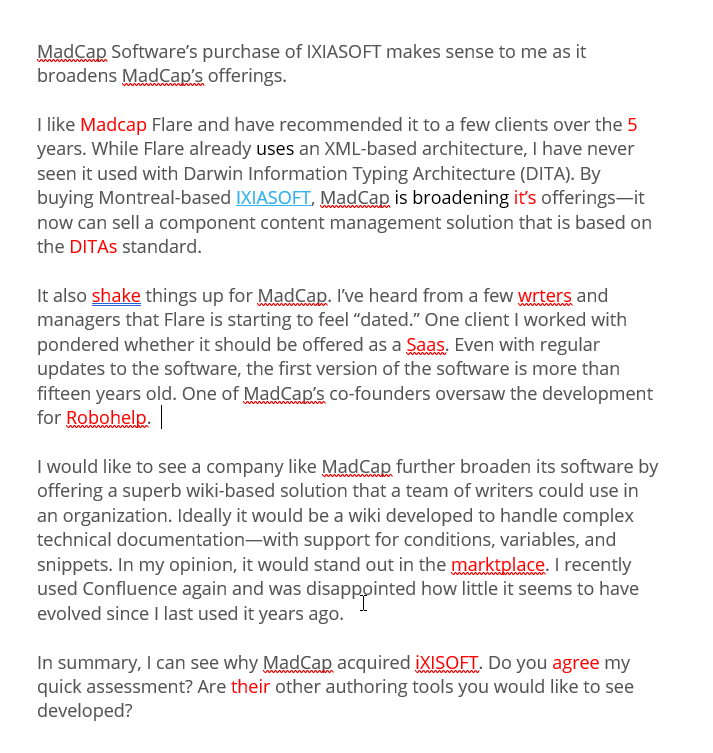
I decid­ed to give it a test. I copied an ear­li­er blog that I draft­ed about Mad­Cap Flare and delib­er­ate­ly added errors (high­light­ed in red) to the text. In my state­ment to Chat­G­PT, oth­er­wise known as a prompt, I wrote, “Check the fol­low­ing con­tent for incon­sis­tent acronyms, con­sis­tent spelling of com­pa­ny names, gram­mar and typos, and make sure all num­bers under 10 are spelled out.” 

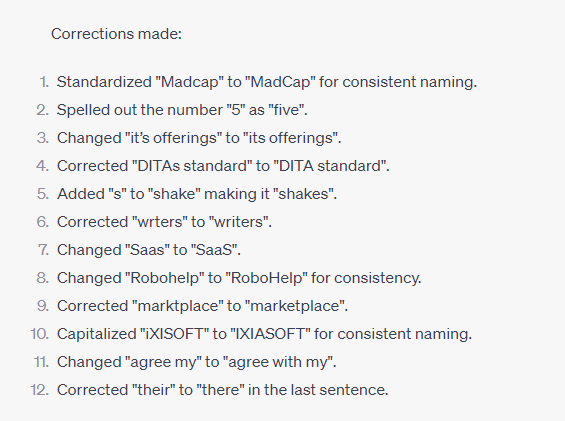
In under 10 sec­onds, the AI tool gen­er­at­ed a new ver­sion of the con­tent and sum­ma­rized the edits made:

Chat­G­PT quick­ly caught all the errors and even cor­rect­ed the case of “Robo­Help,” which is the offi­cial name of the help author­ing tool.

Purge passive voice using ChatGPT

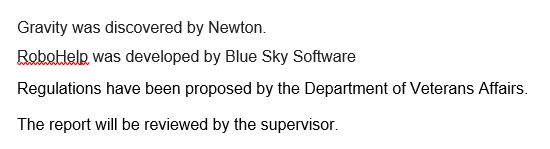
Many tech­ni­cal writ­ing depart­ments fer­ret out exam­ples of pas­sive voice and strive to re-write the con­tent so it is active because the writ­ing is more suc­cinct and eas­i­er to under­stand (of course, there is a place for pas­sive voice). In the fol­low­ing exam­ple, I asked Chat­G­PT to revise the fol­low­ing sen­tences that use pas­sive voice:

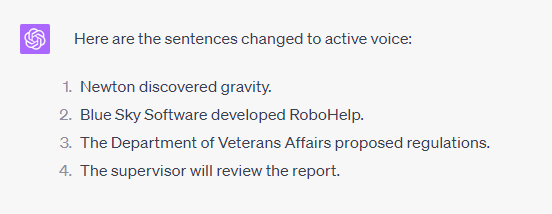
In moments, Chat­G­PT revised the sen­tences so they were active:

ChatGPT does have limitations

The AI tool does have its limitations:

  • Lacks under­stand­ing: If you write a tech­ni­cal report about a mine or a pro­pri­etary soft­ware pack­age, it will not under­stand the details of the con­tent. Sub­ject Mat­ter Experts must still vet the accu­ra­cy of the content.
  • Good prompts are required: Typ­ing vague com­ments like “edit this doc­u­ment” and the tool may not edit what you require. If you want to check a doc­u­ment for pas­sive voice, include the specifics of what you need.
  • Chat­G­PT was last updat­ed in 2021: If you require cur­rent infor­ma­tion about a major world event last year (such as Rus­sian’s inva­sion of Ukraine), Chat­G­PT will be “in the dark.”
  • Be care­ful of con­fi­den­tial­i­ty. See Gen­er­a­tive AI Chat­G­PT Can Dis­turbing­ly Gob­ble Up Your Pri­vate And Con­fi­den­tial Data, Fore­warns AI Ethics And AI Law

Still, it is sur­pris­ing­ly pow­er­ful and fast tool that can help with writ­ing and edit­ing. Check out ChatGPT. 

Filed Under: Career Development, Professional Development, Robert Desprez | Vancouver technical writer | Blog, Technology Tagged With: chatgpt, editing, technology

Four ways Confluence could be better

March 17, 2023 by RDesprez Leave a Comment

Years ago, I used Con­flu­ence and then recent­ly used it again at a client site. I liked it when I first used it but feel dis­ap­point­ed that it does not seem to have evolved. Here are four ways that it could be improved.

What is Confluence?

In case you have not used it, Con­flu­ence is a soft­ware prod­uct that makes it easy to col­lab­o­rate across an enterprise.

Import content from PDFs and Word files

On a past project, I import­ed many old­er Word files and PDFs into Confluence.

The Word and PDF files were very dif­fer­ent from the new tem­plate found in Con­flu­ence so I resort­ed to copy­ing con­tent from the source file to the new tem­plate. Even if I first copied con­tent into a text edi­tor (like Notepad), Con­flu­ence fre­quent­ly changed the fonts or font sizes. Re-apply­ing a para­graph style with­in Con­flu­ence to the word or sen­tence did not fix the issue. For­tu­nate­ly, there’s a workaround.

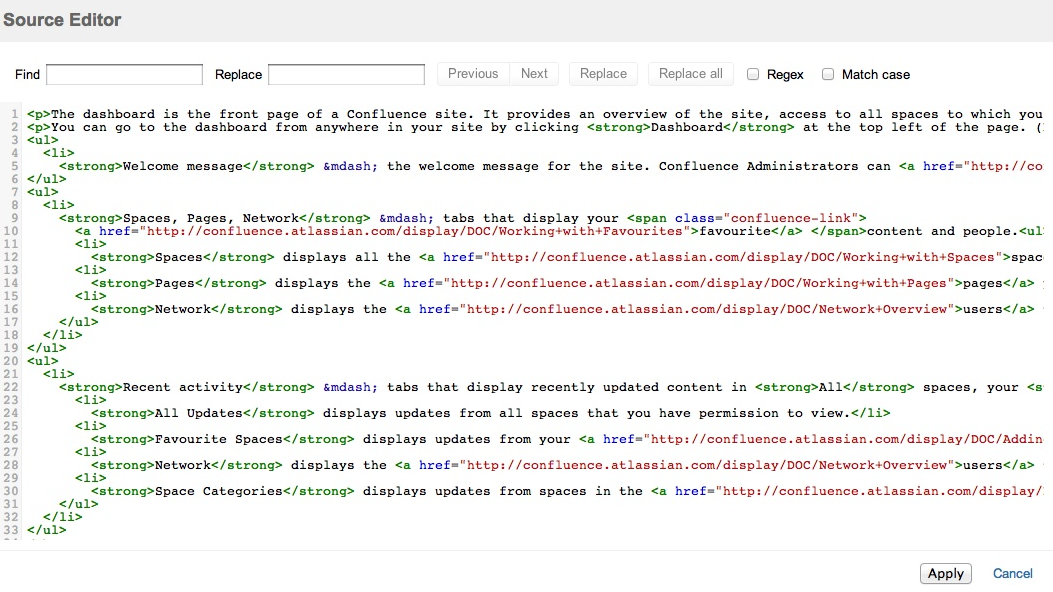
Con­flu­ence Source Edi­tor is a free app that reveals the code on a giv­en page. If all else fails, you can strip out the extra code that is chang­ing the fonts. 


Using Con­flu­ence Source Edi­tor, I can hone in on a cer­tain word and strip out the code that sur­rounds the font. Here is an example:

By strip­ping out the span text, Con­flu­ence then dis­plays the text nor­mal­ly. As some pages can be rid­dled with this extra code, search­ing for and remov­ing it can quick­ly become tedious. 

My sug­ges­tion: Con­flu­ence should address these for­mat­ting issues so that tech­ni­cal authors do not need to fix con­tent this way. At the very least, this Source Edi­tor should be includ­ed in Con­flu­ence with­out hav­ing to search for and install the app.

Search and replace functionality

I worked for a client that rebrand­ed itself, mean­ing that its old name need­ed to be updat­ed on dozens and dozens of Con­flu­ence pages. For author­ing tools like Mad­Cap Flare, the search fea­ture can eas­i­ly comb through mul­ti­ple topics. 

Con­flu­ence includes a search and replace tool but it’s only for page by page. This means that some­one updat­ing the clien­t’s name needs to open the page, going to edit mode, find an instance of the old name, and replace it. This is a very time con­sum­ing process.

Con­flu­ence does offer apps that will per­mit you to search across mul­ti­ple pages with­in a space but they’re not free and you need to research, pay, and install the one that you’d like.

My sug­ges­tion: Atlass­ian, the com­pa­ny that makes Con­flu­ence, needs to include a free search and replace tool as part of its core prod­uct that can scan mul­ti­ple pages with­in a space.

Weak conditional text support

If you’ve used tools like Mad­Cap Flare, you under­stand the pow­er of con­di­tion­al text, which you allows you to sin­gle-source and include or exclude spe­cif­ic sets of infor­ma­tion. You can apply a con­di­tion to a char­ac­ter, word, sen­tence, para­graph, or entire sec­tions of content.

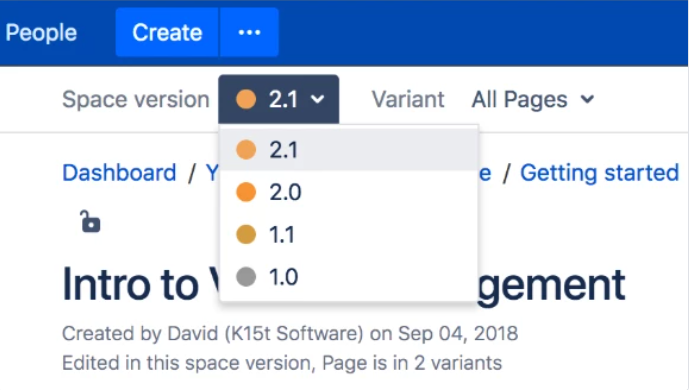
Con­flu­ence includes a form of con­di­tion­al text sup­port but it’s hard­ly robust. Using an app called Scroll Ver­sions, writ­ers can cre­ate dif­fer­ent ver­sions of con­tent and then asso­ciate the con­tent with a “vari­ant.” If you need to cre­ate three dif­fer­ent ver­sions of a para­graph, you can pub­lish three ver­sions using the Scroll Ver­sions app. The main chal­lenge with the app is that it forces users to pick which ver­sion they want to read using a drop­down in Con­flu­ence. Here’s an exam­ple in which a user might select among mul­ti­ple prod­uct versions:

My ver­dict: Although it’s bet­ter than noth­ing, Con­flu­ence’s sup­port is pret­ty weak com­pared to Mad­Cap Flare or oth­er tech­ni­cal writ­ing tools.

No built-in support for variables

In case you haven’t used vari­ables, here’s a def­i­n­i­tion from Mad­Cap’s online help: “Vari­ables are brief, non-for­mat­ted pieces of con­tent (such as the name of your company’s prod­uct or phone num­ber) that can be edit­ed in one place but used in many places…” If you need to update the vari­able, you only need to change it in one place and the change is auto­mat­i­cal­ly made every­where the vari­able appears.

Prod­uct names, cor­po­rate address­es, sup­port phone num­bers all tend to change from time to time. Using vari­ables makes a change super easy. There is an app called Easy Con­flu­ence Vari­ables that may pro­vide some of this func­tion­al­i­ty, although I haven’t had a chance to use it.

I like Con­flu­ence. But if tech­ni­cal writ­ers are going to embrace the tool, Atlass­ian needs to invest more effort in improv­ing it. Besides Con­flu­ence, are there oth­er wikis worth investigating?

Filed Under: Career Development, Help Authoring Tools, Online Writing, Professional Development, Robert Desprez | Vancouver technical writer | Blog Tagged With: Confluence, Madcap Flare, online writing, wikis

First impressions of MadCap’s purchase of IXIASOFT

March 8, 2023 by RDesprez 2 Comments

Mad­Cap Soft­ware’s pur­chase of IXIASOFT makes sense to me as it broad­ens Mad­Cap’s offerings.

I like Mad­Cap Flare and have rec­om­mend­ed it to a few clients over the years. While Flare already uses an XML-based archi­tec­ture, I have nev­er seen it used with Dar­win Infor­ma­tion Typ­ing Archi­tec­ture (DITA). By buy­ing Mon­tre­al-based IXIASOFT, Mad­Cap broad­ens its offerings—it now can sell a com­po­nent con­tent man­age­ment solu­tion that is based on the DITA standard.

It also shakes things up for Mad­Cap. I’ve heard from a few writ­ers and man­agers that Flare is start­ing to feel “dat­ed.” One client I worked with won­dered whether it should be offered as a soft­ware as a ser­vice (Saas). Even with reg­u­lar updates to the soft­ware, the first ver­sion of the soft­ware is more than 15 years old. One of Mad­Cap’s co-founders over­saw the devel­op­ment for Robo­Help, anoth­er help author­ing tool that start­ed in 1992. 

I would like to see a com­pa­ny like Mad­Cap fur­ther broad­en its soft­ware by offer­ing a superb wiki-based solu­tion that a team of writ­ers could use in an orga­ni­za­tion. Ide­al­ly, it would be a wiki devel­oped to han­dle com­plex tech­ni­cal documentation—with sup­port for con­di­tions, vari­ables, and snip­pets. In my opin­ion, it would stand out in the mar­ket­place. I recent­ly used Con­flu­ence again and was dis­ap­point­ed how lit­tle it seems to have evolved since I last used it years ago. 

In sum­ma­ry, I can see why Mad­Cap acquired IXIASOFT. Do you agree with my quick assess­ment? Are there oth­er author­ing tools you would like to see developed?

Filed Under: Help Authoring Tools, Professional Development, Robert Desprez | Vancouver technical writer | Blog, Technology Tagged With: DITA, Madcap Flare, xiasoft

Online conferences for technical writers in 2023

March 7, 2023 by RDesprez Leave a Comment

Here is a list of inter­est­ing in-per­son and vir­tu­al con­fer­ences for tech­ni­cal writ­ers in 2023:

Write the Docs, May 7 to 9, 2023, Port­land, Ore­gon
Write the Docs

Women in Tech Glob­al Con­fer­ence, May 9 to 11, 2023
Women in Tech

STC annu­al con­fer­ence, May 14 to 17, 2023, Atlanta, Geor­gia
http://summit.stc.org/

Evo­lu­tion of TC, June 6 to 7, 2023
Evo­lu­tion of TC 2023

Write the Docs Atlantic 2023, Sep­tem­ber 10 to 12, 2023, online
Write the Docs

Mad­World Con­fer­ence, Octo­ber 8 to 11, 2023, San Diego, Cal­i­for­nia and online ver­sion
Mad­World

Lava­con, Octo­ber 14 to 17, 2023, San Diego, Cal­i­for­nia
http://lavacon.org

Write the Docs Aus­tralia (details to be announced)

Filed Under: Career Development, Professional Development, Robert Desprez | Vancouver technical writer | Blog

  • 1
  • 2
  • 3
  • …
  • 19
  • Next Page »

About Robert Desprez

I have worked as a Vancouver technical writer for more than 20 years, working at some of British Columbia's largest high-tech firms. I have served in leadership positions for the Society for Technical Communication and have worked as a writing instructor at Vancouver's Simon Fraser University.

Robert Desprez Follow 1,192 242

Vancouver Technical Writer. Former Instructor at Simon Fraser University. Dog Lover. Coffee Drinker. Tennis and Piano Player.

robert_desprez
robert_desprez avatar; Robert Desprez @robert_desprez ·
1 Dec 1995356944983543936

Amazon Workers Issue Warning About Company’s ‘All-Costs-Justified’ Approach to AI Development

...

www.wired.com

Reply on Twitter 1995356944983543936 Retweet on Twitter 1995356944983543936 0 Like on Twitter 1995356944983543936 0 Twitter 1995356944983543936
robert_desprez avatar; Robert Desprez @robert_desprez ·
17 Nov 1990511045618889117

Image for twitter card

Jeff Bezos reportedly to co-lead AI startup called Project Prometheus

Move marks first time the Amazon founder will have an operational role at a company since 2021

www.theglobeandmail.com

Reply on Twitter 1990511045618889117 Retweet on Twitter 1990511045618889117 0 Like on Twitter 1990511045618889117 0 Twitter 1990511045618889117
robert_desprez avatar; Robert Desprez @robert_desprez ·
13 Nov 1988989060904546771

Why long-running tasks autonomously carried out by agentic AI aren’t the future of doc work, and...

As AI agents become more capable, there’s growing eagerness to develop long-running tasks that operate autonomously ...

idratherbewriting.com

Reply on Twitter 1988989060904546771 Retweet on Twitter 1988989060904546771 0 Like on Twitter 1988989060904546771 0 Twitter 1988989060904546771
robert_desprez avatar; Robert Desprez @robert_desprez ·
5 Nov 1985944193135755385

Image for twitter card

Federal budget dedicates over $1B to boost Canadian AI and quantum computing | CBC News

Prime Minister Mark Carney’s first budget proposes providing more than $1 billion over the next five years to bu...

www.cbc.ca

Reply on Twitter 1985944193135755385 Retweet on Twitter 1985944193135755385 0 Like on Twitter 1985944193135755385 0 Twitter 1985944193135755385
Load More

Recent Blog Posts

  • Using ChatGPT to read smarter
  • ChatGPT: The AI-powered proofreader
  • Four ways Confluence could be better
  • First impressions of MadCap’s purchase of IXIASOFT

About Me

Robert Desprez I have worked as a Vancouver technical writer for more than 20 years, working at Kodak, Boeing, Teck Resources, and FortisBC. In addition, I have worked as a writing instructor at Simon Fraser University in Vancouver.

Contact Me

Robert Desprez Com­mu­ni­ca­tions Inc.
North Van­cou­ver, British Columbia
Canada
Phone: 604–836-4290

  • Email
  • LinkedIn
  • Twitter

Copyright © 2025  · Robert Desprez Communications Inc.